Explicit Animations in Flutter 2
In the previous post, I explained how to get started with explicit animation in Flutter. In this post, I’ll walk you through how to build a simple animation using all the classes I mentioned. We’re going to make a hand-waving animation using the wave hand emoji.
Setting up your project
Since the app is intended to only run on Android, I’ll be using the flutter create command to only build the project for Android. Flutter builds a project for some default platforms(Android, IOS, Windows, Linux, Macos, Web); if you want to build for specific platforms, you can specify them using the platforms option.
flutter create --platforms android wave_hand_app
Clean up the default project template in your main.dart file, leaving only the main method and the stateless widget class. You should have something like this now afte converting your default class to a stateful widget class.
void main() {

    runApp(
        const MaterialApp(
            title: 'Wave',
            home: MyApp(),
        ),
    );

}

class MyApp extends StatefulWidget {

    const MyApp({super.key});

    @override
    State<StatefulWidget> createState() {
        return MyAppState();
    }

}

class MyAppState extends State<MyApp> {

    @override
    Widget build(BuildContext context) {
        return Text('hello world');
    }

}
Using the animation classes
As said in the previous post, to use the animation controller class to build explicit animation, we need to first use the Ticker mixin. This class helps send a notification to the animation controller that a new frame has been rendered to the screen. We will use the SingleTickerProviderStateMixin because we only have one animation controller we intend on using to manage our animation.
class MyAppState extends State<MyApp> with SingleTickerProviderStateMixin {
    ....
}
Once this is done, we can go ahead and create and initialize our animation objects. Create instance variables within the state class.
class MyAppState extends State<MyApp> with SingleTickerProviderStateMixin {

    late AnimationController _waveController;
    late Animation _waveAnim;
    late Tween _waveTween;

    int waveDuration = 150;

    @override
    void initState() {
        super.initState();
        // vsync is a TickerProvider interface and requires a class that
        // uses the TickerProvider mixin
        _waveController = AnimationController(
            vsync: this,
            duration: Duration(milliseconds: waveDuration),
        );
        // the begin and end values were justified by how much further
        // i wanted the hand wave animation to go on the z-axis.
        _waveTween = Tween<double>(begin: -5.0, end: 30.0);
        _waveAnim = _waveTween.animate(_waveController);
    }


    @override
    void dispose() {
        // releases the resources used
        _waveController.dispose();
        super.dispose();
    }

    ....

}
Putting together the needed widgets
In this project, I made use of the animated builder widget, the transform widget, and a text widget to hold a wave hand emoji.
AnimatedBuilder widget is a general-purpose widget for building animations. This widget provides a way to handle complex animations while making sure it doesn’t sacrifice performance, optimizing the animation as it renders.
Transform widget applies transformation to its child before painting it on screen. In our use case, we will be applying a rotation on the z-axis to a Text widget and animating it back and forth; this will in turn create a hand wave animation.
Widget _buildWaveHand() {
    return Row(
        mainAxisAlignment: MainAxisAlignment.center,
        children: [
            Text(
                'Hello there',
                style: GoogleFonts.lexend(fontSize: 24),
            ),
            AnimatedBuilder(
                animation: _waveAnim,
                builder: (context, child) {
                    return Transform(
                        key: const Key('transformer'),
                        transform: Matrix4.identity()
                            ..rotateZ(_waveAnim.value.toRad),
                        alignment: Alignment.bottomRight,
                        child: child,
                    );
                },
                child: GestureDetector(
                    onTap: _startWaveAnim,
                    child: const Text(
                        key: Key('wave-emoji'),
                        style: TextStyle(fontSize: 24),
                    ),
                ),
            ),
        ]
    );
}

void _startWaveAnim() {
    final ticker = _waveController.repeat(reverse: true);
    ticker.timeout(
        Duration(milliseconds: waveDuration * 6),
        onTimeout: () {
            _waveController.stop();
            _waveController.animateTo(0);
        }
    );
}

extension on double {
    // you'll need to import dart:math to access pi.
    // rotateZ angle is required to be in radians
    double get toRad => this * (pi / 180);
}
In order to apply the transform, we use rotateZ from the Matrix4 class. An identity is applied to the matrix to prepare for any transformation.
I have a text widget wrapped in a gesture detector that listens for tap events and triggers the animation to start when the event is detected.
The _startWaveAnim method uses the repeat method of the animation controller class, which repeats the animation indefinitely. In order to stop the animation after a certain duration, we use a Ticker returned by the repeat method to manually timeout the animation.
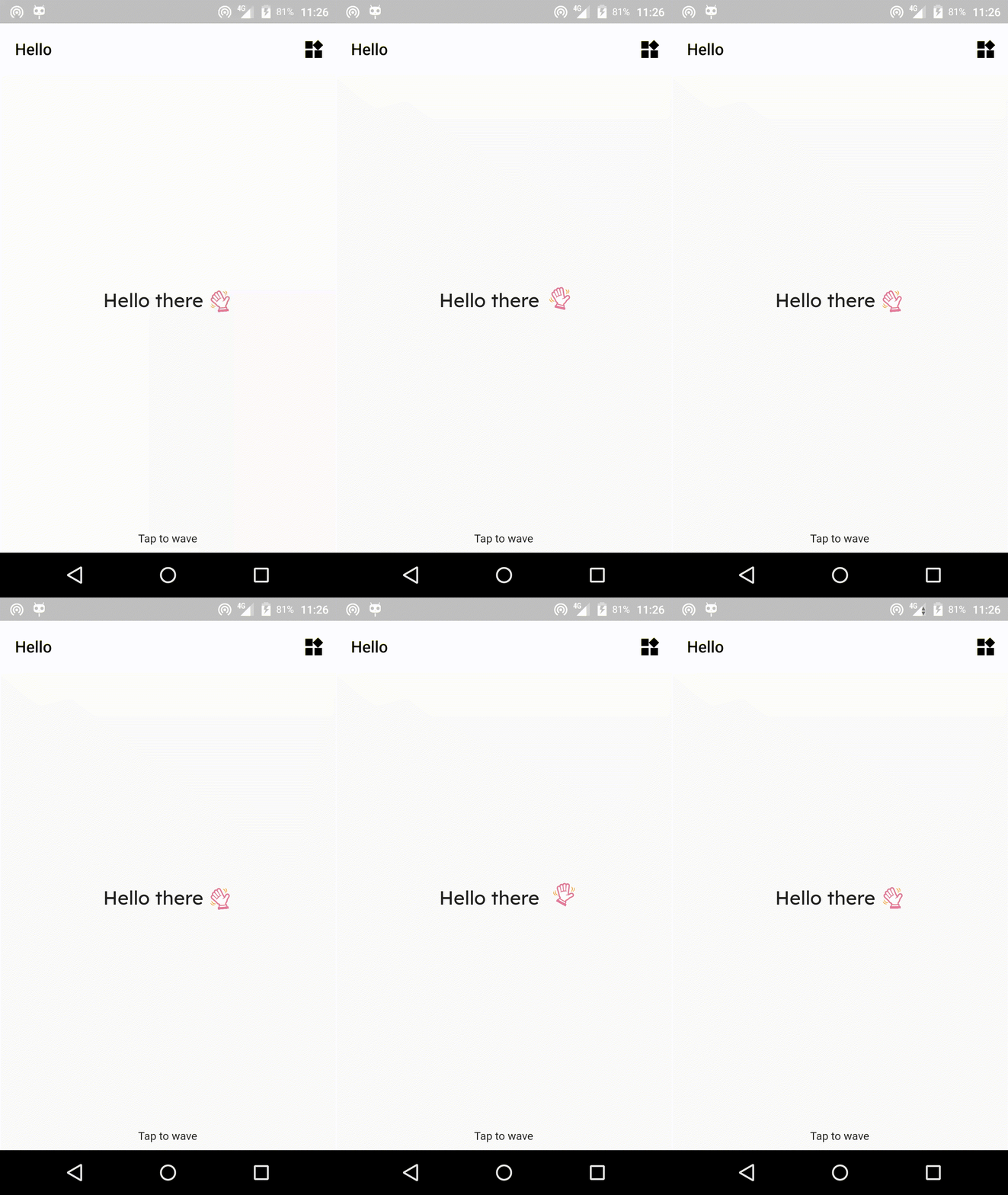
You can insert this _buildWaveHand in your widget tree and you should be good to go. Here we go; this is what I have. If you follow this post, the emoji on your device may be different. This is because each manufacturer has its own implementation of emoji ISO codes.
Ending here
So far, we have been able to build a simple wave hand animation, and I hope you enjoyed the journey. If I missed something or made any blunders, kindly reach out. and let me know if there are any corrections to be made. I rarely build explicit animations, so this project and post really let me dive deep into the classes when I was preparing this post. Thanks for reading.